Mojo Helpdesk Goes Great with Google Workspace
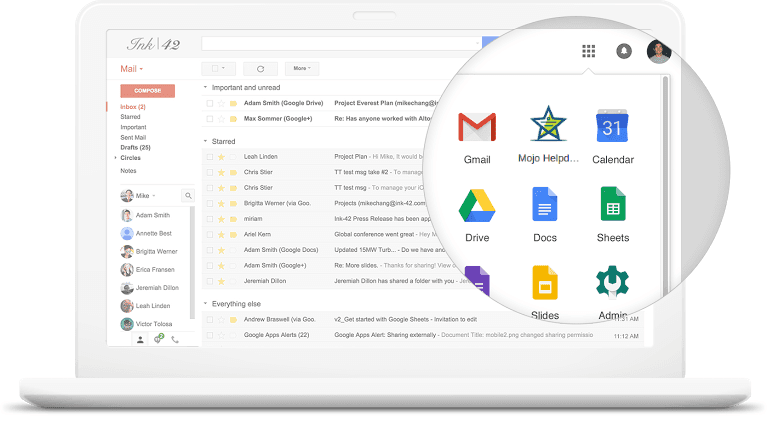
Run your help desk where your team already works. Mojo Helpdesk integrates with Google Workspace so users can log in with their Google accounts, jump into Mojo from the Gmail app launcher, and turn shared inbox chaos into a structured ticketing system. It’s the fastest way for Google-first organizations to centralize requests and keep nothing from slipping through the cracks.
Google Workspace help desk in minutes
Install from Google Workspace Marketplace
Add Mojo Helpdesk to your Google domain from the Marketplace, associate a new or existing helpdesk, and you’re ready to go – no long implementation project required.
One login with your Google account
Users sign in to Mojo using their Google Workspace credentials, so there’s no extra username or password to manage, and less friction for every agent and requester.
Launch Mojo from the Google app launcher
Once installed, Mojo appears alongside Gmail, Drive, and other Google apps so staff can hop into the help desk with a click instead of hunting for another URL.
Work where your team already works – Gmail + Mojo Helpdesk
If your support address lives in Gmail (for example, support@yourcompany.com), Mojo Helpdesk turns that mailbox into a full help desk:
Automatic ticket creation from Gmail
Incoming emails to your support address are pulled into Mojo Helpdesk and converted into tickets, preserving the sender, subject, and message body.
Replies sent through Gmail
When agents respond from Mojo Helpdesk, messages are sent via your Gmail configuration, so customers still see the familiar support address they trust.
No more lost or duplicated threads
Instead of fishing through a shared inbox, agents get assigned tickets, filters, and queues – while customers can keep emailing like they always have.
Keep your Google users in sync with SSO
For IT and Workspace admins, Mojo Helpdesk slots cleanly into your identity stack:
Centralize user management in Google Workspace
Control who can access Mojo Helpdesk using existing Workspace accounts and groups, rather than managing yet another user directory.
One-click access for every user
Users can click the Mojo Helpdesk icon from Google Workspace and be signed in automatically, which cuts down training and login issues.
Fewer password resets, tighter security
Because authentication runs through Google, you benefit from your existing security policies, MFA, and access controls.
Connect Google Drive and the rest of your Workspace tools
Mojo Helpdesk doesn’t stop at SSO. You can hook it into the Workspace tools your team already lives in:
Create tickets from Google Drive activity
Use no-code automation platforms like Zapier to create a Mojo Helpdesk ticket whenever a new folder is created in a specific Google Drive location – handy for onboarding, client projects, or incident folders.
Tie help desk workflows to Google Sheets and Gmail
Trigger tickets from Sheet updates, automatically log new requests from Gmail labels, or notify internal teams when a ticket status changes using Workspace-friendly automations.
Keep everything in one ecosystem
Instead of bolting on another complex platform, you let Google Workspace stay the front door while Mojo Helpdesk provides the structure, automation, and reporting behind the scenes.
Who uses Mojo Helpdesk with Google Workspace?
K-12 and higher education
School districts and universities use Google Workspace and Mojo together so teachers, staff, and students can log in once and get help with technology, facilities, or HR from the same place.
IT and internal service teams
IT, HR, and operations teams transform Gmail requests into manageable queues, with SLAs, automation, and satisfaction tracking – without forcing the business off Google.
Small and midsize businesses
SMB companies that started support in a shared Gmail inbox graduate to Mojo for structure and reporting, while keeping the same email addresses and accounts they already use.
If your organization runs on Google Workspace, Mojo Helpdesk lets you add a professional ticketing layer without disrupting how people sign in or communicate.
How to connect Mojo Helpdesk and Google Workspace
1. Install Mojo from Google Workspace Marketplace
Sign in as a Google Workspace admin, open the Marketplace, search for “Mojo Helpdesk,” and install the app for your domain.
2. Associate or create your helpdesk
Launch Mojo Helpdesk from the Google app launcher and either connect to an existing Mojo account (with the same admin email) or create a new helpdesk.
3. Enable Gmail email-to-ticket
Configure your Gmail support mailbox so Mojo Helpdesk can retrieve mail and send replies. Once it’s set, emails to your support address will automatically become tickets.
4. Roll out to users
Let your team know they can now access Mojo Helpdesk via the Google app launcher and their Google login. From there, you can layer on queues, automations, and a knowledge base.
Frequently asked questions
Mojo Helpdesk is trusted by over 2.5 million users
The helpdesk solution that helps teams resolve requests faster and stay in control.
Sign up for Mojo Helpdesk today
Get a ticket system production-ready in seconds.